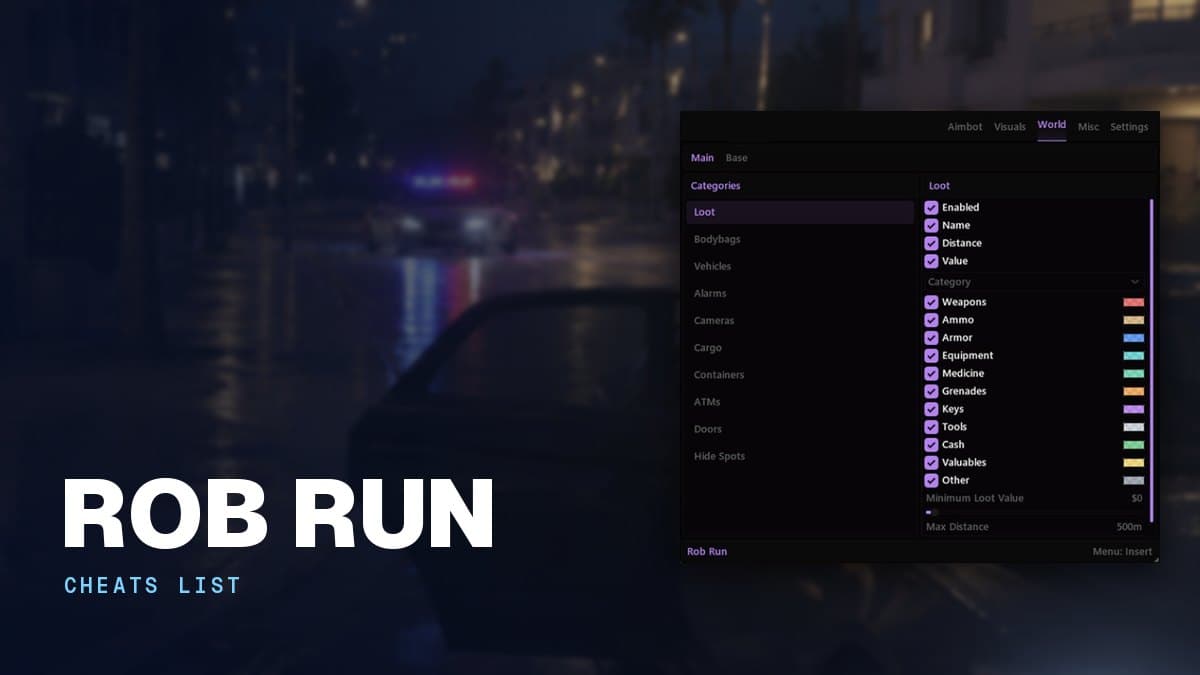
Rob Run cheats list: Silent Aim, Out-of-FOV Arrows, ATM ESP, Base Fuse ESP and every other Rob Run External feature, each under its exact name.
Rob Run External has an aimbot with silent aim, chams, a radar with map and minimap views, and ESP for players, loot, vehicles, ATMs, alarms, bases and workbenches, plus Freecam and zoom. If a feature is not on this page, Rob Run External does not have it.
Rob Run External is the cheat on our Rob Run cheats page, and as of 24 November 2026 this list matches its product page item for item, with every name spelled the way that page spells it. Items that sit in more than one group, such as Adjustable Render Distance, appear under each of them.
Rob Run cheat features at a glance
Each group has its own section below, in the order the product page uses. In the menu itself the tabs read Aimbot, Visuals, World, Misc and Settings, and the groups here follow the product page rather than those tabs. New to terms such as ESP, chams or the FOV circle? Our guide to what Rob Run cheats are explains them.
| Group | What it covers |
|---|---|
| Aimbot | Aim help on a key you choose: normal or silent aim, an FOV circle, smoothing, and rules for which players it picks |
| Player ESP | Boxes, skeletons, names, clans, held items and distance on other players, plus indicators such as reloading or sprinting |
| Radar | The players around you on a radar, a map or a minimap, with arrows toward anyone outside your view |
| Chams | Glow, blur and see-through materials on player models, your own included |
| Loot ESP | Labels on loot with name, distance and the menu's own value, plus type, rarity and value filters |
| World ESP | Cargo, containers, ATMs, doors and vehicles, with vehicle owners and distances |
| Security ESP | Alarms, with the distance to each one |
| Base ESP | Player bases: owner, clan, buildings, storage, cargo, garages and defenses |
| Workbench ESP | Workbenches at player bases, with laundering desks, grow tables and production |
| Misc | Field of view, zoom, a free camera, lobby and friends tools, and fonts |
Aimbot: silent aim, the FOV circle and targeting
Rob Run is an extraction shooter at heart, and its shootouts are with other players. The Aimbot group is the menu's aim help for those fights, and among its items are the aim mode, the rules for who it targets and the settings that shape how the aim moves.
- Aimbot is the aim help itself, and Custom Aim Keybind puts it on a key you pick.
- Normal Aim turns your crosshair onto the target. Silent Aim keeps your crosshair still and redirects the shot instead, and Silent Aim Hitchance sets the chance that it acts on a given shot.
- Custom Aim Point Selection chooses where on a player's body the aim lands.
- FOV Circle marks the zone around your crosshair where the aimbot looks for players. Adjustable Aim Radius sets its size, Dynamic FOV Circle lets that size change, and Custom FOV Circle Color picks its color.
- Aimbot Smoothing slows how fast the aim swings onto a target, and Aimbot Humanization makes that swing less regular. Aimbot Deadzone leaves a small zone around the target where the aim stops correcting.
- Aimbot Visible Check limits the aimbot to players it can see, and Aimbot Max Distance caps how far away a target can be. Keep Target keeps it on the player it picked.
- Ignore Role and Target Role Filters set which player roles it may target, and Ignore Team stops it aiming at your own team.
- Aimbot Target Line draws a line to the player it is aiming at. Custom Target Line Color sets the color of that line, and Target Line Only When Active shows it only while the aimbot is in use.
- Also in this group: Aimbot Prediction, Ignore Knocked and Auto Shoot (Risky).
Player ESP: boxes, skeletons, names and indicators
Player ESP is the part of the menu that keeps track of people. It marks other players on your screen, and many of the items below decide what each mark shows and which players get one.
- Player ESP marks other players, Box ESP puts a box around each one, and Skeleton ESP draws a stick-figure skeleton over each body.
- Player Names shows each player's in-game name, and Clan Tag ESP shows their clan. As of November 2026, player names carry over from one server wipe to the next.
- Held Item ESP shows the item a player is holding, and Distance ESP adds the distance to them.
- Visible Check separates the players you can see from the ones you can't, and Custom Occluded Colors draws the hidden ones, behind walls or cover, in a color you pick.
- Reloading Indicator, Crouching Indicator and Sprinting Indicator flag a player who is reloading, crouching or sprinting, and In Vehicle Indicator flags anyone in a car or helicopter.
- Ignore Teammates leaves the players in your party unmarked.
- Individual Role Settings and Custom Role Colors give every player role its own options and its own color.
- Adjustable Render Distance sets the range at which players are marked.
- Also in this group: Knocked Indicator and Armor Indicator.
Radar: player radar, map, minimap and out-of-FOV arrows
The Radar group gives you a view from above of who is around you, as a radar, a map or a minimap, plus arrows for players outside your view. In a police chase, the arrows cover the directions you are not facing.
- Player Radar is the radar itself, and Player Direction Arrows add an arrow for the way each player faces. Map Radar shows the same players on a map instead, and Minimap Radar on a minimap.
- On the map, Map Grid System adds a grid and Vehicle Map Icons adds icons for vehicles.
- On the minimap, Minimap Scale (1x-5x) sets the scale and Names On Minimap shows names.
- Radar Vehicle Filters sets which vehicles make it onto the radar, Radar Role Filters does the same by player role, and Show Teammates decides whether your teammates appear on it.
- Adjustable Radar Radius sets how large the radar is, and Adjustable Radar Distance sets how far from you it reaches.
- Draggable Radar Position lets you move it to any spot on your screen, and Orientation Lock holds its orientation still.
- Custom Radar Colors, Custom Radar Background and Adjustable Background Opacity set its colors, its backdrop and how see-through that backdrop is. Custom Player Marker Size and Adjustable Indicator Size set how big the player markers and other indicators on it are drawn.
- Out-of-FOV Arrows show the direction of players beyond the edges of your screen. Adjustable Arrow Radius sets how far from the center of the screen they sit, Adjustable Arrow Size sets how big they are, and OOF Role Filters and Role-Based Arrow Colors sort them by player role.
- Also in this group: Names On Hover Map and Distance Visualizer.
Chams: glow and see-through materials on player models
Chams color the player models themselves instead of drawing a label beside them, so people stand out against the streets of Looty Bay or the open desert. The group sets which models get a material and which material each one wears.
- Player Chams puts a material on other players' models, and Local Player Chams puts one on your own character.
- Custom Cham Materials lets you choose the material, and Independent Material Selection lets other players and your own character wear different ones.
- Glow materials: Purple Glow Chams, White Glow Chams, Cyan Glow Chams, Lime Glow Chams and Banana Glow Chams.
- Cyan Blur Chams is a blurred cyan material, and Red See-Through Chams a see-through red one.
- Pink Chams and Orange Chams color a model pink or orange.
Loot ESP: item types, values and filters
Looty Bay is where Rob Run's heists happen, and the reward is what you carry out: cash, and valuables to sell. Loot ESP puts a label on those finds and on the rest of the loot around you.
- Loot ESP labels the items around you, Loot Names writes the name of each item on its label, and Loot Distance adds how far away it lies.
- Loot Value Display writes the menu's own value for each item on its label, and Minimum Value Filter hides anything the menu values below a number you set.
- Cash ESP marks loose cash, and Valuables ESP marks valuables, the finds players sell to the fence (as of November 2026).
- Weapon ESP, Grenade ESP and Ammo ESP mark weapons, grenades and ammo.
- Equipment ESP marks gear and equipment, and Medicine ESP marks healing items.
- Key ESP marks keys, and Tool ESP marks tools.
- Loot Category Filters switches whole item types on or off, and Custom Category Colors gives each type its own color. Loot Rarity Filters and Custom Rarity Colors do the same by rarity.
- With Adjustable Render Distance you choose how far out loot is labeled.
- Also in this group: Armor ESP.
World ESP: cargo, ATMs, doors and vehicles
World ESP covers the rest of what is around you: cargo, the ATMs where banked money comes back out, doors, and the vehicles people get around in. Everyone in Rob Run starts out with a rented car, and a helicopter can even turn up in loot.
- Cargo ESP picks out cargo, the loads players take home to their base and open there (as of November 2026).
- Container ESP marks containers you can loot, and Door ESP marks doors.
- Vehicle ESP marks vehicles in general, and Car ESP, Van ESP, Helicopter ESP and Police Car ESP each pick out one kind: cars, vans, helicopters or police cars.
- Vehicle Owner Display names the owner of each vehicle, and Custom Vehicle Colors sets the colors vehicles are drawn in.
- ATM ESP shows ATMs, the machines players use to withdraw banked money.
- Money At Fence ESP marks money at the fence, where players sell their valuables (as of November 2026).
- Individual ESP Toggles switch each object type on or off by itself, Custom Object Colors sets their colors, Object Distance Display adds the distance to each, and Independent Render Distance gives World ESP a range of its own.
- Also in this group: Hide Spot ESP, Bodybag ESP, Bodybag Despawn Timer and Vehicle Death Box ESP.
Security ESP: alarms and their distance
Security ESP covers alarms. In a Looty Bay robbery, tripping an alarm can bring the police down on you. Our Rob Run heist cheats guide takes a whole job stage by stage, alarms included.
- Alarm ESP marks alarms, Alarm Distance adds how far each one is from you, and Custom Alarm Colors sets the color they are drawn in.
- Adjustable Render Distance controls the range at which alarms are drawn.
- Also in this group: Camera ESP, Camera Distance, Disabled Camera Indicators, Hacked Camera Indicators, Custom Camera Colors and Hacked Alarm Indicators.
Base ESP: owners, clans, storage and defenses
Rob Run bases are built out in the desert, and players store loot and vehicles in them. Base ESP shows what a base holds before you get close. Our Rob Run raid cheats guide follows a raid from both sides, the raider's and the owner's.
- Base Overview ESP marks player bases from a distance. Base Owner Display names the player who holds each plot, and Base Clan Display names the clan tied to it.
- Building ESP marks the buildings on a plot.
- Storage ESP finds the storage at a base, and Storage Contents shows what is stored in it.
- Cargo ESP finds cargo kept at a base, and Cargo Contents shows what that cargo holds.
- Garage ESP finds garages, and Garage Contents shows the vehicles parked in them.
- Defense ESP points out the Security System at a base, along with its defense modules, and Defense Status tells you the state those defenses are in.
- Base Fuse ESP marks the fuses at a base. As of November 2026, fuses go in a base's Security System and make it slower to hack.
- Custom Category Colors gives each kind of base object its own color, and Adjustable Render Distance decides the range at which bases appear.
- Also in this group: Defense Timers and Base Status Display.
Workbench ESP: laundering desks and production
As of November 2026, players run farms, labs and cargo cracking at their bases, and launder their cash at a Laundering Desk there. Workbench ESP marks that working side of a base.
- Workbench ESP marks the workbenches at player bases, Workbench Contents shows what is loaded into each one, and Workbench Timers shows the time left on its job.
- Laundering Desk ESP marks each base's Laundering Desk, the desk players run their cash through.
- Production ESP shows a base's production, from farms to labs, and Grow Table ESP picks out grow tables.
- Cargo Opening ESP marks cargo set up to open at a base.
- Individual Workbench Filters switches each kind of workbench on or off, Custom Workbench Colors sets their colors, Workbench Distance Display adds the distance to each, and Adjustable Render Distance limits how far out they are drawn.
- Also in this group: Crypto Farm ESP, Workbench Status and Cargo Exchange ESP.
Misc: field of view, zoom, Freecam and lobby tools
Misc holds the tools that belong to no other group, among them how wide you see and how far you zoom, a free camera, the lobby and friends tools, and fonts.
- FOV Changer and Adjustable Field of View change how wide your view of the game is.
- Zoom enlarges what sits at the center of your view, Custom Zoom Keybind gives it a key of its own, and Adjustable Zoom FOV sets how close it brings things.
- Freecam lets you move a free camera away from your character.
- For the lobby and your friends, the menu has a Lobby and Friends Panel, plus a Draggable Lobby Viewer Widget you can drag around the screen.
- Player Search finds a player in the menu.
- Search by Clan or Grid Location lets you search by clan or by grid location.
- Saved Friends keeps a friends list in the menu. With Right-Click Add/Remove Friends, a right click adds a friend or removes one, and Friend Team Colors puts your friends in a color of their own.
- Mouse Wheel Scrolling adds scrolling with the mouse wheel, and Full Font Customization lets you change the fonts.
- Also in this group: No Flash, Instant Loot Search, Last Seen Grid Locations, Battle Mode, Custom Battle Mode Keybind and Last Known Roles.
Not on this list? Rob Run External does not have it
Every feature of Rob Run External sits in one of the sections above, under the name its product page gave it on 24 November 2026.
The menu does change over time. For anything added after that date, check the Rob Run External product page.
The same feature list on every key length
Rob Run External keys differ in how long they last, not in what they include. Whichever length you pick, you get every feature on this page.
Everything on this list comes with Rob Run External. Choose a key length on its page, where each one shows its price.
Frequently asked questions
Yes. Custom Occluded Colors in Player ESP draws players behind walls or cover in a separate color, and Visible Check tells you which players are in plain view. The chams also include a see-through material, Red See-Through Chams.
Yes. Held Item ESP, in Player ESP, shows the item each player is holding, and Distance ESP adds how far away they are. Player Names and Clan Tag ESP add each player's name and clan.
Yes. With Aimbot Visible Check, the aimbot picks only players it can see. Aimbot Max Distance adds a limit on how far away a target may be, and the FOV Circle marks the zone around your crosshair where it looks.
Yes. Minimap Radar, in the Radar group, puts the radar into a minimap, and the same group lists Minimap Scale (1x-5x) and Names On Minimap. Map Radar, which draws the radar as a map, is there too.
Yes. Freecam is in the Misc group. It turns your view into a free camera that you move away from your character, and the zoom and field of view tools sit in the same group.
Yes. Adjustable Render Distance appears in Player ESP, Loot ESP, Security ESP, Base ESP and Workbench ESP, which is why it shows up in several sections here. World ESP has Independent Render Distance, and the radar has Adjustable Radar Distance.
Yes. Color settings run through the menu, from Custom FOV Circle Color in the Aimbot group to Friend Team Colors in Misc, and the chams come in colored materials. Full Font Customization, also in Misc, covers fonts.